Comparison
Cohere North alternative: onAI with DeepL
Cohere North is an enterprise AI workspace with chat and custom agents. Choose onAI for everyday document work, DeepL translation and images, with direct support from EUR 17 per user per month including EUR 5 of model use.
Decide how much infrastructure you will operate
onAI runs on servers in Europe with a Swiss contracting party. You can request a dedicated server or run onAI on your own servers.
North’s private deployment runs on customer Kubernetes infrastructure, in a cloud account or on-premises, with an air-gapped option. Your team operates infrastructure, networking and security and must provide the required components and model capacity. Local application storage and external model or tool services are separate choices. Scope those dependencies before treating a private installation as a fully local workflow.
- onAI
- Swiss contracting party, servers in Europe On request a dedicated server or on-premises
- Cohere North
- Customer cloud, on-premises or air-gapped Customer-operated Kubernetes; infrastructure, GPUs and external-service dependencies need scoping
Compare the licence and operating scope
onAI starts at EUR 17 per user per month, including EUR 5 of model use. Larger teams pay less, or choose a fixed price for the whole company. Onboarding and training are included in the fixed price.
North uses custom enterprise pricing. Its licence dimensions include Compute Units for model capacity and Application Instances for separately administered installations. Numerical North licence rates and included usage are not public. Request an offer covering the models, installations, infrastructure, deployment services and external providers you need, with currency, billing period and VAT specified. Separate model API tariffs do not give you the total North price.
- onAI
- From €17 per user/month Includes €5 of model use; lower for larger teams, or a fixed price
- Cohere North
- Custom enterprise pricing Compute Units and Application Instances; numerical North licence rates not public
Put common employee tasks within reach
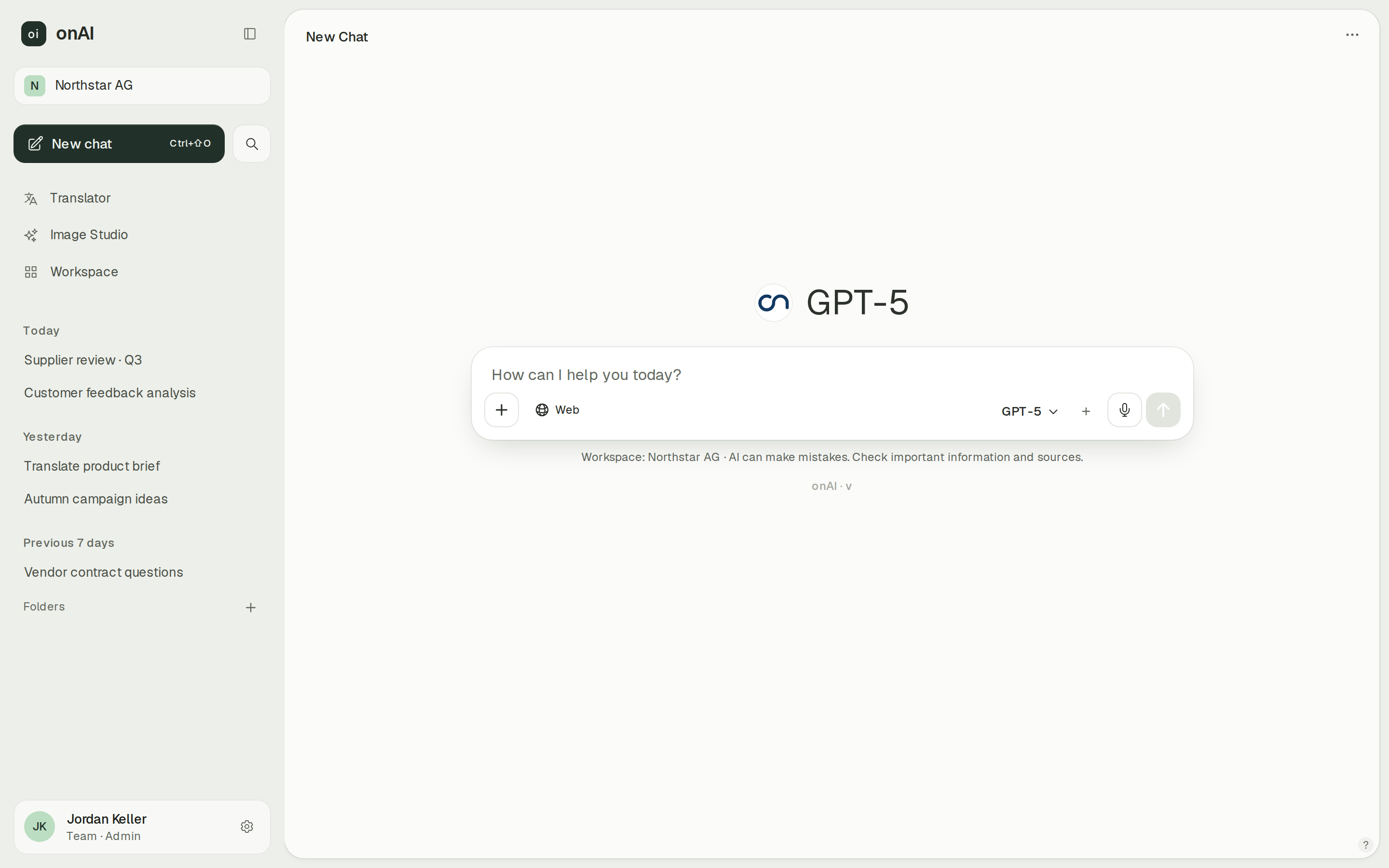
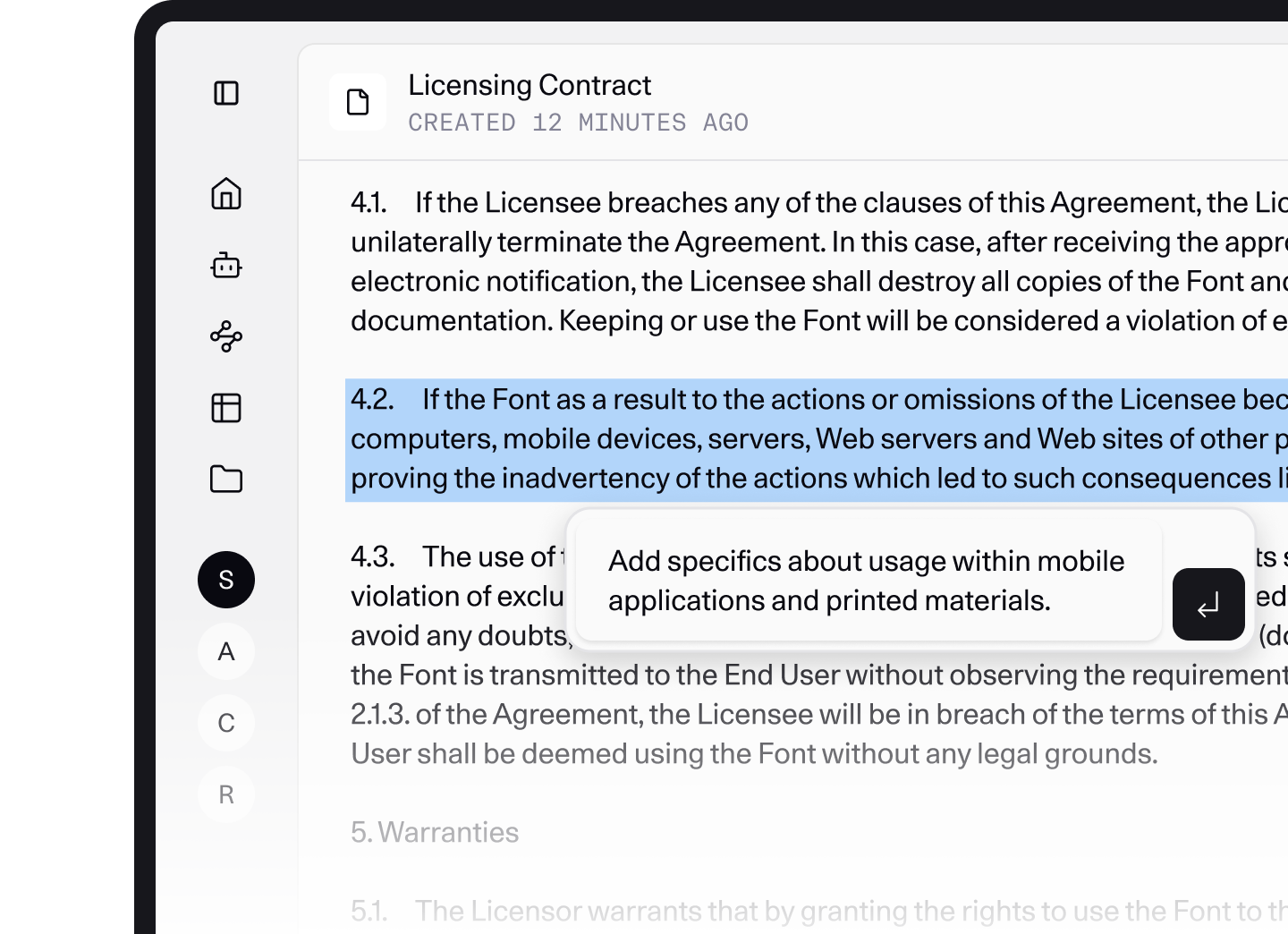
onAI offers an uncluttered interface without technical settings. Employees upload PDF, Word or Excel files directly in chat and ask questions about them. You can share chats with colleagues by link and create assistants with instructions and knowledge for your team.
North also provides browser chat and custom agents. Its Document mode supports rewriting, tone and length changes, manual edits and prompt-guided revision with history. That editor is useful when employees want to keep refining a draft. Use a representative document task to judge which interface fits the people doing the work.
- onAI
- Uncluttered interface in the browser No technical settings, nothing to install
- Cohere North
- Browser chat and document editor Rewrite, change tone or length, and make manual edits
Choose models and who configures the providers
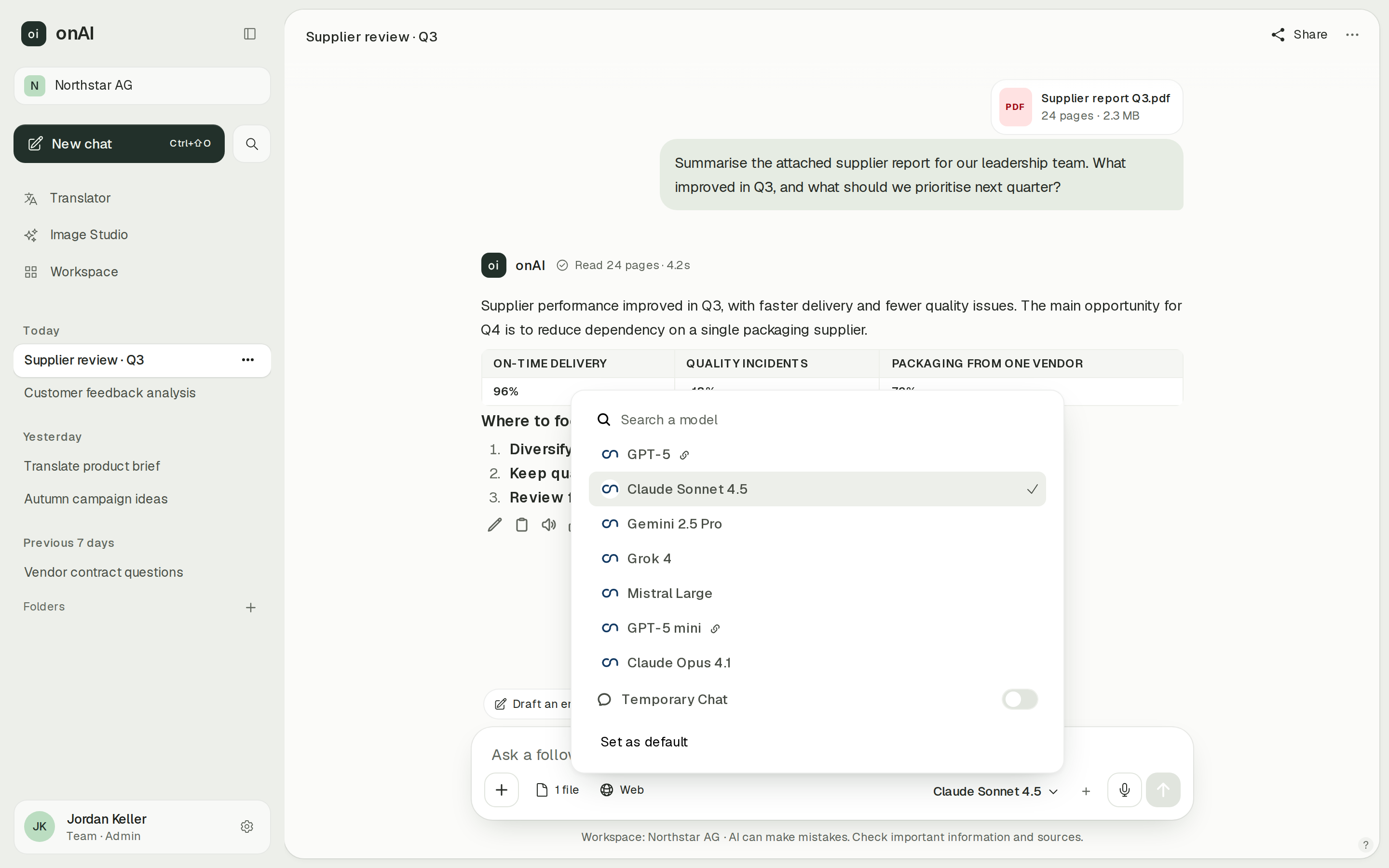
onAI lets employees choose among administrator-approved Claude, GPT, Gemini, Grok and Mistral models. Administrators decide which models each group can use. Your own provider contracts and API keys are possible on request; on-premises installations can connect local models, for example through Ollama.
North’s default-agent chat has a model picker, and custom agents select models in their settings. The deployment’s configured providers determine what is available. North supports customer API keys, compatible OpenAI endpoints and provider routes such as Azure OpenAI, Bedrock and SageMaker. Those are configuration options, not a promise that every deployment includes the same model catalogue.
- onAI
- Models allowed per group Admins allow or block each model
- Cohere North
- Customer-configured model providers Base chat and agent model selection; deployed providers determine the available choices
No public documentation screenshot of Cohere North was available on the research date.
Assign access to employees and specialist administrators
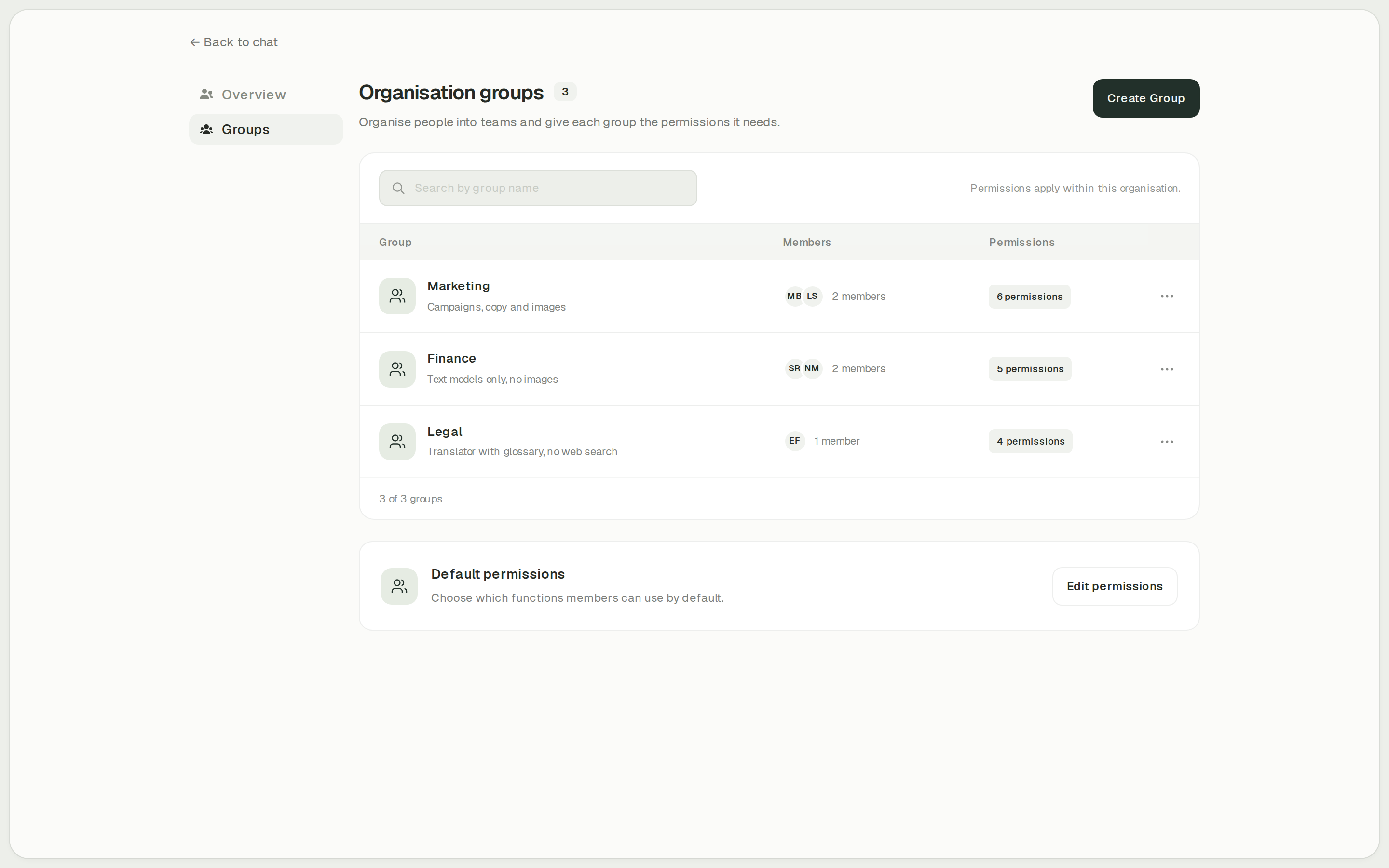
onAI administrators enable functions such as Image Studio, translation and web search per group. Cost limits apply per organisation and person, and reports show use by model, feature and person. You can grant the tools a department needs and keep an overview of its use.
North has specialist roles for agents, automation and tools, as well as custom roles. Permissions and resources can be assigned to users, identity-provider groups or the company. Some permissions require direct assignment to users or groups outside roles. Separately administered installations, including subsidiary deployments, count as separate licensed Application Instances, so organisational separation also affects the commercial scope.
- onAI
- Roles and groups Features enabled per group, for example Image Studio, translator
- Cohere North
- Custom roles and group permissions Agent, tool and automation administration; some grants require assignment outside roles
No public documentation screenshot of Cohere North was available on the research date.
Case Study
Secure AI for 6,800 employees: how Manor established a privacy‑compliant alternative to ChatGPT across the company with onAI.
Thanks to the latest AI capabilities in onAI, our employees are more productive and use them securely and compliantly — at an affordable fixed price.
Where onAI fits better
onAI fits a rollout centred on common employee tasks, with direct provider support in German and English. It combines an uncluttered chat interface with dedicated translation and image tools.
Translate documents and create images
DeepL handles documents with their layout, company glossaries and formal or informal address. In Image Studio, compare up to three models on one prompt, edit with up to ten reference images and see estimated costs before generating.
Include rollout help in the company offer
The company fixed price includes onboarding and training. You reach our team directly, and service levels and response times are agreed in the contract. We build custom agents and workflows as a service, so you can discuss those tasks with the same team.
Where Cohere North fits better
North fits organisations with the infrastructure team to operate a private AI platform and builders who will maintain their own workflows. It is a custom enterprise purchase, with the deployed models, tools and infrastructure determining the result.
Operate the platform in an isolated environment
North documents whole-platform on-premises and air-gapped deployment on customer Kubernetes, including local model services. The customer must provide the infrastructure and component dependencies. External search, APIs and remote MCP tools require network access, so define the disconnected workflow explicitly rather than assuming every connected feature remains available.
Build visual workflows with human review
North’s node builder combines model, agent and tool steps with conditions, loops and Human Review. Workflows can run on schedules or through the authenticated execute API after IT provisions the models and connectors. This fits departments that will configure and maintain repeated processes themselves.
Register compatible model endpoints
North accepts customer provider credentials and supports compatible OpenAI endpoints and vLLM. The provider and model must support the tool and response schemas your deployment uses. This is useful if your infrastructure team needs to configure its own inference endpoints within the enterprise installation.
What onAI could do better
A smaller feature set and custom work
onAI deliberately focuses on what employees use daily and has fewer features than some platforms. We build custom agents and workflows as a service. Include responsibility for future workflow changes in your evaluation.
At a glance
Licence pricing
- onAI
- From €17 per user/month Includes €5 of model use; lower for larger teams, or a fixed price
- Cohere North
- Custom enterprise pricing Compute Units and Application Instances; numerical North licence rates not public
Application deployment
- onAI
- Swiss contracting party, servers in Europe On request a dedicated server or on-premises
- Cohere North
- Customer cloud, on-premises or air-gapped Customer-operated Kubernetes; infrastructure, GPUs and external-service dependencies need scoping
Provider credentials and endpoints
- onAI
- Own keys on request For example Azure, OpenRouter
- Cohere North
- Own keys and compatible endpoints Customer-configured providers; model/tool compatibility still applies
Custom assistants
- onAI
- Own assistants, shared with teams With instructions and knowledge
- Cohere North
- Versioned custom agents Instructions, models and tools; sharing subject to permissions
Access administration
- onAI
- Roles and groups Features enabled per group, for example Image Studio, translator
- Cohere North
- Custom roles and group permissions Agent, tool and automation administration; some grants require assignment outside roles
Comparing onAI with Cohere North?
Book a demo. We show onAI with your own use cases and answer your data-protection questions.
Book a demoQuestions you might have
- Does private deployment include every North feature?
- A private installation and a disconnected workflow are different scopes. North can run on-premises or air-gapped, but external search, model APIs and remote MCP tools need network access. Establish the components, GPU capacity and permitted external services for your actual tasks.
- Is North priced per user like onAI?
- North documents custom enterprise pricing with Compute Units and Application Instances. Those dimensions do not establish a public per-user tariff or a complete operating cost. Compare a scoped North offer with onAI’s per-user or company fixed-price offer, including the model use and operating responsibilities covered.
- Can we evaluate onAI before committing to a rollout?
- onAI starts with a personal demo, followed by trial access for your team. Use documents and translation tasks that employees will actually handle. Onboarding and training are included if you choose the company fixed price.
How this page was made
Research date: • Method: the vendors' public sources, collected and checked by AI agents and assessed against the onAI comparison rubric v1.1.
AI agents collected and checked public Cohere documentation; this comparison uses the separately reviewed research and keeps deployment-specific capabilities separate. onAI uses owner statements and reviewed model-family display text. The component migration notice concerns the named legacy components, not the whole North product.
Written by onAI. We make one of the two products compared here, so this is a vendor's comparison. We checked every statement about Cohere North against a public source; the sources are listed in this page's structured data.